How I Use AI
Most people use AI the same way they used Google. Type a question, get an answer, move on. That’s fine. It’s genuinely useful at that level. But it’s also the lowest level.
There’s a spectrum to how people work with AI, and where you sit on it changes what you get out of it.
The Levels
Level 1 — Chat. Ask questions, draft emails, summarise documents. One-shot prompts in a browser tab. No memory, no integration, no continuity. Most people are here.
Level 2 — Tool-assisted. Copilot in the IDE, autocomplete, inline suggestions. The AI knows what file you’re in. It doesn’t know your project.
Level 3 — CLI and agentic. Running AI from the terminal. Asking it to write code, run tasks, make changes. More powerful, still stateless. Each session starts blank.
Level 4 — Project-integrated. The AI has context loaded before the first prompt. It knows the stack, the conventions, the decisions already made. Output is consistent across sessions because the briefing doesn’t change.
Level 5 — Orchestrated. Multiple projects, multiple contexts, a layer above the work that routes and tracks and holds the operational picture. The AI handles the operational layer so you can stay at the strategic one.
I work at level 4 going on 5. I run multiple client engagements concurrently. Each one is at a different stage — one in hypercare, another mid-migration, another wrapping up. The switching cost between them is real, and the standard AI tools don’t help with that by default.
The Constraints
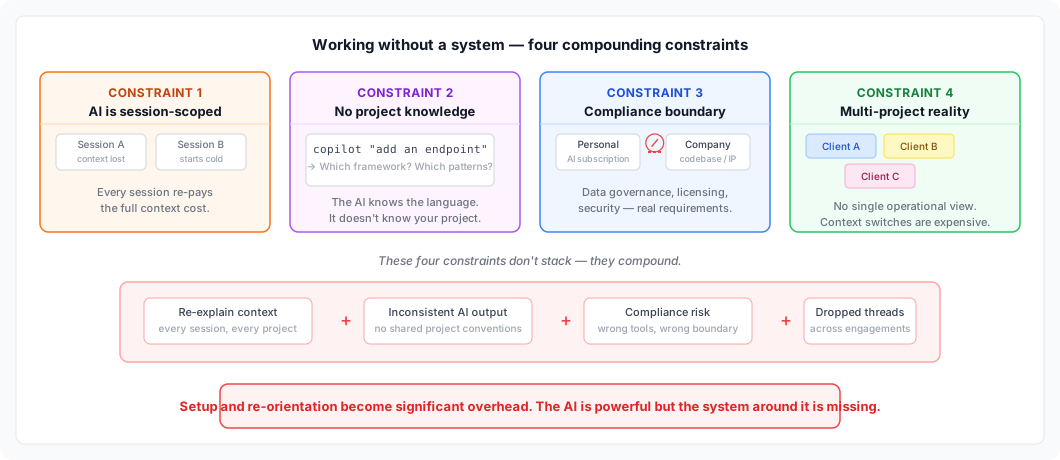
There are four constraints that shape how AI can actually work at enterprise scale. They don’t stack — they compound.
1. AI tools are session-scoped, not work-scoped
Every session starts cold. No memory of last week’s architecture discussion. No recollection of why that pattern was chosen. No awareness that you already solved this problem in a slightly different form two weeks ago.
For a one-off question, that’s fine. For sustained work on a complex system — one you’ll be living in for months — you re-pay the full context cost every single session. And you pay it again when you hand over to another consultant who needs to get up to speed.
The AI is powerful. But without a system around it, it has the memory of a goldfish.
2. The AI knows the language, not the project
A code assistant knows that you’re writing TypeScript. It doesn’t know that your team uses a specific error-handling pattern, that the ORM was chosen for a compliance reason, or that the naming convention in this module diverges from the rest of the codebase for a historical reason that’s documented nowhere.
The gap between “knows the language” and “knows the project” is enormous. Most AI usage operates in that gap without realising it. You get plausible output that’s subtly wrong — not wrong enough to fail a build, but wrong enough to create inconsistency, confusion, and rework.
3. Enterprise has a compliance boundary
A company’s code cannot flow through a personal AI subscription. This isn’t bureaucratic friction — it’s data governance, IP ownership, licensing, and security policy. These requirements exist for real reasons and they don’t go away because the tool is useful.
Any system that ignores this boundary isn’t a system. It’s a workaround that will eventually be flagged, shut down, or retrospectively create a legal problem. The right answer is to operate inside the boundary from day one — using the tooling the company has approved, inside the environment the company controls.
4. Consulting means operating across multiple concurrent engagements
At any point I’m running three or four client engagements simultaneously, each at a different stage, each with its own stack, team, open questions, and operational history. The cognitive overhead of that isn’t the work itself — it’s the switching cost between contexts.
A message arrives about one client’s deployment issue while you’re deep in a completely different codebase. Different people, different architecture, different decisions in flight. Standard AI tools don’t help with this. They’re scoped to a conversation, not to a body of work.
The Solution (Today)
There are two distinct things I need to keep organised as a consultant: my view of everything I’m running, and the project-level context that lives inside each engagement. These are different problems and they live in different places.
Two Layers, Two Homes
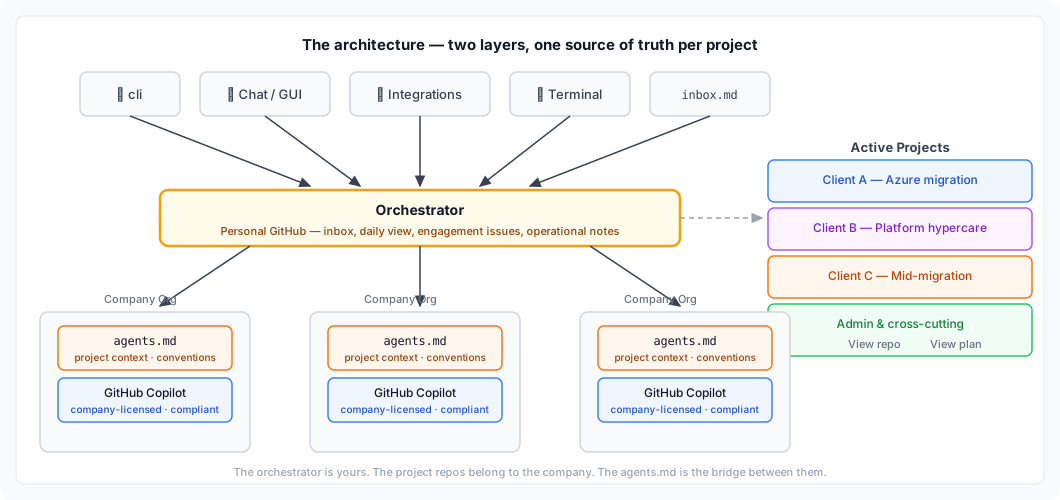
The orchestrator layer — my inbox, my daily view, my running logs across clients — lives in a private repo in my personal GitHub. That’s described in detail here. It’s the operational continuity layer. Nothing to do with client code, nothing to do with the company.
The project layer is different. That lives in the company’s GitHub organisation.
When I start an engagement, a repo exists (or gets created) in the client or company’s GitHub org. That’s where the code lives. That’s where the PRs go. That’s where the work happens. My personal orchestrator holds a reference to it — a link in the engagement issue — but the substance is over there, not here.
This separation matters. The company’s IP stays in the company’s org. My operational notes stay private. They’re connected by reference, not by proximity.
The agents.md File
Every project repo I work in gets an agents.md file at the root.
The name is intentional. Not CLAUDE.md, not .copilot-instructions.md, not anything tool-specific. agents.md — because the instructions inside should be useful regardless of which AI assistant picks them up. Copilot today, something else tomorrow. The file stays relevant.
What goes in it:
# agents.md

## Project Overview
What this project is, what it does, and who it's for.

## Architecture
Key decisions, patterns in use, what to avoid.

## Working Conventions
How PRs are structured, branch naming, test expectations.

## Context for AI
What an AI assistant needs to know to be useful here without asking basic questions every session.
It’s not documentation for humans — there’s a README for that. It’s the briefing file for an AI assistant starting cold on this codebase. The goal is: no wasted context, no repeated explanations, consistent output across sessions.
I treat it as a living file. When something tricky comes up — a non-obvious architectural decision, a pattern that looks wrong but isn’t — I add it. Future sessions start with that knowledge already loaded.
Company-Blessed AI Tooling
The work inside the project repo happens with whatever AI tooling the company has approved. In most engagements, that’s GitHub Copilot.
This is the right call. Copilot operates within the company’s GitHub organisation, uses the company’s licences, and keeps code in the company’s context. There’s no question of where the data goes or which model is seeing which codebase. IT has already made that decision.
The agents.md file is what makes Copilot useful in that context. Without it, every Copilot session starts blank — it knows the language, not the project. With it, the instructions load immediately and the assistant behaves consistently with the project’s conventions from the first prompt.
How It Fits Together
The flow looks like this:
- Orchestrator (personal GitHub) — holds the engagement issue, inbox, daily view, operational notes
- Project repo (company GitHub org) — holds the code, PRs, and
agents.md - Copilot — operates inside the project repo, informed by
agents.md, authorised by the company
My personal layer doesn’t touch client code. The company’s layer doesn’t need to know about my other engagements. The agents.md is the bridge that makes the AI useful inside a bounded, compliant environment.
Why This Structure Works
The orchestrator stays clean. It holds operational continuity — what’s open, what’s next, what’s blocked — without becoming a dumping ground for project artefacts.
The project repo stays self-contained. A new team member, or a new AI session, can come in cold and get up to speed from the repo itself. The agents.md is part of that.
Compliance isn’t an afterthought. Using company-blessed tooling inside the company’s org is the default, not a workaround. The structure enforces the boundary naturally.
The instructions outlast the tool. When the company’s approved tooling changes — and it will — agents.md stays relevant. The conventions, the context, the architecture notes don’t need to be rewritten. They just get picked up by whatever comes next.
Where This Goes
The system works well today, but it’s still largely manual in the connective tissue. I tell the orchestrator to process my inbox. I decide when to update the agents.md. I make the judgment call on what context to capture.
The direction this points is toward more autonomous operation. An orchestrator that notices when a project’s agents.md is stale and prompts to update it. An AI that can surface relevant context from a previous engagement when a similar problem appears in a new one. A tighter loop between what I learn on a project and what the next session starts with.
The agents.md pattern scales in another direction too. Right now it’s a single file per repo. As AI assistants get better at multi-repo context and agentic task execution, that file becomes the entry point for something closer to an autonomous team member — one that knows the project, follows the conventions, and operates within the boundaries the company has set.
The infrastructure is already there. The repos, the GitHub org, the approved tooling. What’s coming is the capability layer on top of it.
The orchestrator is for me. The project repo is for the engagement. The agents.md is for the AI. Each thing has its place — for now, and for what comes next.