Deploying a Test Azure Landing Zone
This is a walk through of deployment of an Azure Platform Landing Zone in my personal test environment.
Target Use Case
- Deploy a greenfield azure platform landing zone to a client environment.
- For testing, a DevOps engineer will need to deploy a greenfield azure landing zone to their own environment to play and explore.
Azure Platform Landing Zone Overview
When someone thinks about an Azure Landing Zone, they think about what they need to run their workloads in Azure. Subscriptions, security logs and vnets. However, it is important to abstract landing zone into 2 layers.
- Platform Landing Zone
- Application Landing Zone
The platform landing zone is the centralized layer. Management groups, policy, hub networking, identity, security tooling that every application landing zone needs.
It’s not a workload environment. It’s the scaffolding.
- management group hierarchy
- policies inherited down from the root
- hub VNet with firewall and Bastion
- logging and role assignments that make everything governable.
Examples of popular Azure Platform Landing Zone Accelerators
Usually you don’t write the code from scratch. No one does. There are a handful of accelerators out there that already package the Microsoft reference architecture into deployable code.
- Azure/ALZ-Bicep: Microsoft’s own reference implementation. Modular, well-documented, the closest thing to a “vanilla” ALZ in Bicep.
- Azure/terraform-azurerm-alz: same conceptual architecture, Terraform flavour, if that’s your IaC of choice.
Fork or wrap one of these repos with your own naming conventions, policies, and pipeline.
Greenfield Azure Platform Landing Zone
A “gold plated” greenfield platform landing zone is really a handful of layers stacked in dependency order:
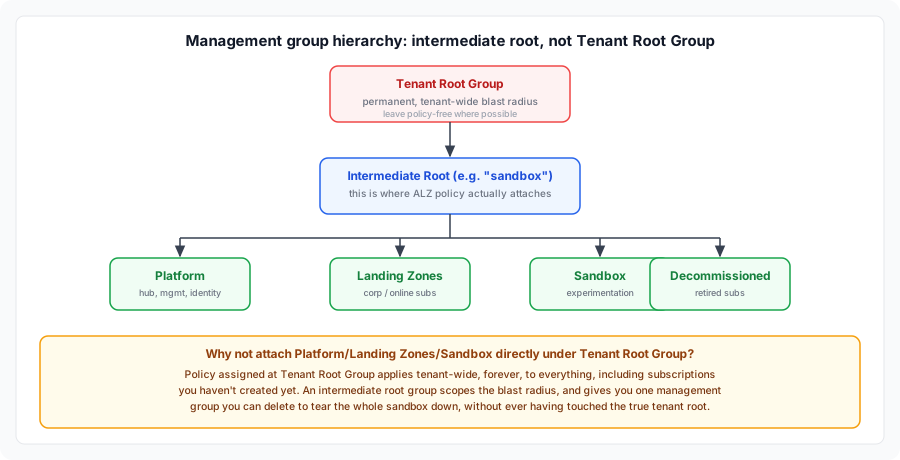
- An intermediate root management group: created directly under Tenant Root Group, not attached to it. This is the actual top of your ALZ hierarchy, everything below is genuine ALZ structure. Tenant Root Group itself stays close to untouched.
- Management group hierarchy: the tree everything else attaches policy and RBAC to (
Platform,Landing Zones,Sandbox,Decommissioned, etc., under that intermediate root, not under your true tenant root). - Custom role definitions: if the built-in Azure RBAC roles don’t fit your operating model.
- Hub networking: a hub VNet, Azure Firewall, Bastion, and (optionally) a VPN or ExpressRoute gateway for on-prem connectivity.
- Platform management: Log Analytics workspace, Azure Monitor, diagnostic settings wired up centrally so every subscription forwards logs to one place.
- Platform identity: Entra ID groups, PIM-eligible roles (licensing permitting), conditional access baselines.
- Policy: the ALZ default policy initiative assignments, plus any custom definitions and exemptions your organisation needs.
- Role assignments: RBAC tying identities to management groups/subscriptions.
- DNS: private DNS zones for private endpoints, conditional forwarders if you’re hybrid.
Everything downstream (application landing zones, workloads) sits on top of this and inherits policy and connectivity from it.
Why an intermediate root group, not Tenant Root Group
Tenant Root Group is permanent, you can’t rename or delete it, and every subscription in the tenant sits under it implicitly, including things that have nothing to do with your landing zone. Assigning policy directly at Tenant Root Group means it applies tenant-wide, forever, to everything, including subscriptions you haven’t created yet. If an assignment turns out wrong, you can’t un-scope it the way you can by just deleting a child management group.
Microsoft’s own ALZ conceptual architecture creates an intermediate root management group (named after the org, e.g. contoso, or for a sandbox, something like sandbox) directly under Tenant Root Group, and that’s where Platform, Landing Zones, Sandbox, Decommissioned etc. actually attach. For a test tenant this also means your entire hierarchy is one management group you can delete to tear everything down, without ever having touched the real tenant root.
What to omit to save costs
A sandbox doesn’t need every bell and whistle the reference architecture ships with. Things I’m skipping for a personal test deployment to my test tenant:
- Azure Firewall Premium: the Standard SKU is enough to prove the pattern.
- VPN/ExpressRoute gateways: unless you’re specifically testing hybrid (billing is hourly whether you use them or not).
- Defender for Cloud paid plans: the free tier (CSPM foundational) is enough to see policy and posture data.
- Bastion entirely, at first: skip it until you actually need to reach a VM. The accelerator makes this a one-line toggle (
azBastionEnabled: false), it doesn’t need to be removed and re-added later. Just keepAzureBastionSubnetreserved in your hub VNet’s subnet list even while it’s disabled, otherwise you’ll need to resize the VNet to fit it back in. When you get to testing a spoke deployment and need to actually access workloads, flip the toggle totrue(Basic SKU is enough) and redeploy just the connectivity stage, it slots into the already-reserved subnet without touching anything else. - Sentinel: billed per GB ingested. Turn it on if you’re specifically testing the SIEM integration
- Multiple regions: deploy to one region.
Run a script against the Azure Retail Prices API (or the Azure Pricing Calculator manually) before you deploy: it’ll price out exactly what you’re about to spin up, in your currency and region, so there are no surprises.
Figures below are australiaeast, priced in AUD. They’re the always-on baseline only (deployment/gateway hourly fees you pay regardless of usage), excluding variable/consumption meters (data processed, data transferred, storage, per-operation) which scale with actual usage and are close to zero for an idle test environment.
| Component | Typical platform landing zone (reference architecture) | Test deployment (components skipped) | Bare shell (hub/spoke only, no Firewall/Public IP) |
|---|---|---|---|
| Azure Firewall | Standard, $1,377.29/mo | Standard, $1,377.29/mo | omitted, $0 |
| Azure Bastion | Standard SKU, $302.62/mo | omitted initially, $0 (Basic SKU, $198.22/mo once you flip it on for spoke testing) | omitted, $0 |
| VPN Gateway | VpnGw1AZ, $219.10/mo | omitted, $0 | omitted, $0 |
| ExpressRoute Gateway | ErGw1AZ, $376.70/mo | omitted, $0 | omitted, $0 |
| Public IP | Standard, $5.18/mo | Standard, $5.18/mo | omitted, $0 |
| Total always-on baseline | ~$2,280.89/mo | ~$1,382.47/mo initially, ~$1,580.69/mo once Bastion is on for spoke testing | ~$0/mo |
That last column is a hub/spoke shell with no Firewall, no Bastion, no gateways, no public IP: just VNets, peering, NSGs, and route tables. None of those carry a fixed always-on meter in the Retail Prices API, they’re billed on data processed/transferred, which is close to zero for an idle sandbox. That makes it effectively free to prove out the management group hierarchy, policy assignments, RBAC, and hub-spoke peering/routing before you spend anything on the networking appliances layered on top.
How to deploy to your test environment
-
Get Owner at the tenant root (via a Global Admin enabling “Access management for Azure resources,” or an existing root-scope Owner granting it to you).
-
Create an intermediate root management group directly under Tenant Root Group (this is your actual ALZ root, keep Tenant Root Group itself untouched).
-
Clone an accelerator that deploys a platform landing zone following Microsoft’s ALZ best practices.
Populate its private, gitignored config file with prerequisites (at a minimum four values)
- tenant ID
- intermediate root management group ID (not Tenant Root Group)
- subscription ID
- region
-
Run a pre-flight check script first: it validates your PowerShell, Az module, Bicep, and CLI versions, and confirms you actually have the root-scope permissions (elevating and self-assigning Owner if needed) before you waste time on a deployment that’s going to fail halfway through.
Sample output when everything’s already in place:
Checking PowerShell version (7.5.2)...
OK: PowerShell 7.5.2 meets the minimum (7.0).

Checking Az PowerShell module version...
OK: Az PowerShell 16.0.0 meets the minimum (10.0).

Checking Azure CLI version...
OK: Azure CLI 2.87.0 meets the minimum (2.51).

Checking Bicep CLI version...
OK: Bicep 0.44.1 meets the minimum (0.20).

All prerequisites confirmed. You're good to deploy.
And when a tool’s missing or outdated, it flags exactly what to fix instead of failing partway through a deployment:
Checking Bicep CLI version... WARNING: Bicep CLI not found. Install it: az bicep install Exception: One or more tooling prerequisites are not met. Install/upgrade the flagged tools, restart your shell, and re-run this script. -
Deploy stage by stage with
whatif: truefirst, then flip it off once you’re confident: management groups, then hub connectivity, then platform management, then platform identity, then policy assignments, then role assignments.
How to tear it down
Management group-scoped deployments don’t clean up after themselves the way a resource group does: there’s no single az group delete that removes everything. Tear-down needs to happen in reverse dependency order:
-
Remove policy assignments first. You can’t delete a management group with active assignments attached.
-
Remove RBAC role assignments.
-
Delete resource groups containing hub networking, monitoring, and identity resources
az group delete --name <rg> --yes --no-waitworks fine for this -
Delete any subscriptions you vended for testing
-
Delete the management groups themselves, working from the leaves up. DONT DELETE ROOT TENANT.
-
Double check Log Analytics workspaces and Key Vaults: both soft-delete by default, and will keep quietly costing you (or at least cluttering your tenant) unless purged explicitly.
How to automate it so it runs from GitHub (not your personal PC)
Once it’s running locally move it to GitHub Actions by:
- Set up OIDC, not a service principal secret. Use a script like this to create an Entra app registration with a federated credential trusting your specific GitHub repo/environment or branch. No client secret to rotate or leak.
- Mirror the local stages as workflow jobs. The accelerator should ship
.github/workflows/deploy.ymlas a reusableworkflow_call: each stage (management groups, firewall, policy, RBAC) becomes its own job or workflow, called in dependency order, the same order you ran manually. - Use GitHub Environments for approval gates. Map each deployment stage to a GitHub Environment with required reviewers, so a
whatifplan posts as a PR check and a human approves before the real deployment runs: same governance model as an ADO pipeline, without needing ADO. - Keep sandbox-specific parameters out of the repo history. Store your tenant/subscription IDs as repository or environment secrets/variables, not committed
.bicepparamvalues, even in a personal sandbox: it’s good practice to carry into a real client repo later.